
Digital Membership Card Software for Museums: What to Look For Before You Choose a Platform
Cuseum · June 30, 2026
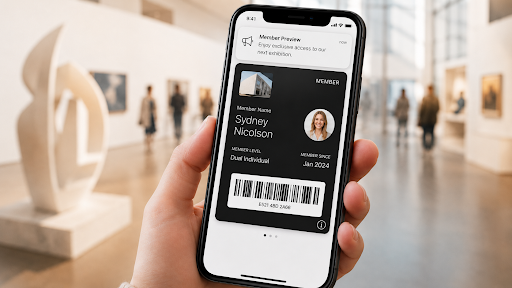
For years, museum membership cards looked simple on the surface: print the card, mail it, replace it when it gets lost, and repeat the process every renewal cycle. But that model has started to show its age, drawbacks, and inefficiencies.
Members expect access from their phones. Front desk teams need a faster way to get members through the door. Membership teams need fewer manual tasks and redundant processes. Development teams need more opportunities to keep members and donors connected between visits.
That is why more museums are looking for digital membership card software instead of relying only on plastic cards, PDFs, or basic membership databases.
But not every digital card solution is built for museums. A generic digital card tool may create a pass, but it may not support the workflows that cultural organizations actually need: membership levels, renewals, reciprocal benefits, member communications, CRM data, mobile wallet delivery, and on-site verification.
This guide explains what to look for before choosing a digital membership card platform for your museum, aquarium, zoo, garden, or cultural institution.
For teams already evaluating options, Cuseum’s digital membership card solution helps museums deliver mobile wallet membership cards, reduce administrative work, and keep members connected through the phones they already use.
What is digital membership card software?
Digital membership card software helps organizations create, deliver, manage, and update membership cards that members can access from their phones.
For museums, this usually means replacing or supplementing plastic membership cards with mobile-friendly cards that can be stored in Apple Wallet, Google Wallet, or accessed through a mobile link.
A strong digital membership card platform should help your team:
- Issue digital cards to new and renewing members
- Display member names, membership levels, expiration dates, and barcodes or QR codes
- Update card details when a membership changes
- Connect card access to your membership database or CRM
- Help members access benefits without waiting for a mailed card
- Reduce printing, postage, replacement, and staff administration
- Create a more convenient member experience
In other words, digital membership card software is not just about the card. It is about making membership easier to manage and easier to use.
Museums that are moving away from plastic cards often start by exploring digital membership cards because they solve a practical problem: members need access now, and staff need fewer manual card-related tasks.
Why museums are replacing plastic membership cards
Plastic cards still work, but they create friction at every stage of the membership journey.
A member joins online, but their card arrives days or weeks later. A card gets lost before a visit. A household membership changes, but the printed card is already outdated. A renewal happens, but the old expiration date still appears on the card. A visitor arrives at the front desk and cannot find their card.
Each of those moments creates extra work for staff and a worse experience for members.
Digital membership cards help solve that by putting the card where members already look: their phones.
According to the Pew Research Center Mobile Fact Sheet, 91% of U.S. adults own a smartphone. That does not mean every museum should remove every physical option, but it does mean mobile access is now a practical default for many members.
For museums, the shift is not only about convenience. It is also about reducing operational drag. A digital card can be delivered faster than a physical card. It can be updated when a membership changes. It can include scannable barcodes. It can point members to benefits, contact information, or renewal actions. And it can help your team reduce the recurring cost of printing and mailing.
Digital membership card software vs. museum membership software
This is an important distinction.
Museum membership software usually refers to the system that stores member records, payments, renewals, households, giving history, and membership levels.
Digital membership card software focuses on the member-facing card experience and the operational workflows connected to that card.
The two should work together. Your membership database may be the source of truth, but your digital membership card platform should turn that data into a card members can actually use.
For example:
- The CRM stores the member record.
- The digital card platform creates the mobile card.
- The member adds the card to their phone.
- The front desk scans or verifies the card.
- The card updates when the membership renews or expires.
That is why integrations matter. A digital membership card platform should not force your team to manually copy and paste member data every week. It should fit into the systems and workflows your membership team already uses.
What to look for in digital membership card software
1. Mobile wallet support
A strong digital membership card platform should support mobile wallet access, including Apple Wallet and Google Wallet where possible.
Apple’s wallet passes can include structured fields, barcodes, visual design elements, localization, and accessibility descriptions. Similarly, Google Wallet also supports digital passes for use cases beyond payments.
For museums, mobile wallet support matters because it reduces the need for members to download a separate app just to access their card. The card can be added to the members’ wallet in just a few seconds, and live in a familiar place on the phone where it can’t be lost or forgotten. That can make adoption easier for members and reduce support questions for staff.
Look for software that supports:
- Apple Wallet passes
- Google Wallet passes
- Mobile web access for members who do not use wallets
- QR codes or barcodes for verification
- Clear card design that works on small screens
- Easy instructions for adding the card to a phone
A good member experience should not require five steps, unique usernames or passwords to log in, or any reason to email for technical support.
2. CRM or membership database integration
The best digital membership card software should connect to your membership data. Without integration, staff may need to manually upload spreadsheets, update expiration dates, fix household records, or resend cards. That can work for a small test, but it becomes painful as the program grows.
Before choosing a platform, ask:
- Can it integrate with our CRM or membership database?
- Can it handle new members, renewals, upgrades, downgrades, and expirations?
- Can it support household memberships?
- Can it manage multiple cardholders under one membership?
- Can cards be updated automatically when member data changes?
- What happens when a membership lapses?
- How does the system handle duplicates?
This is where museum-specific context matters. A museum membership is not always a single person with a single card. It may include spouses, children, guests, reciprocal benefits, donors, or special access rules. Your software should be able to support those real-world membership structures.
3. Easy card delivery
Digital membership cards should be easy to send and easy to access. Members should not need to wait for mail, call the front desk, or search through a long email thread to find their card.
Look for delivery options such as:
- Email delivery
- SMS delivery
- Add-to-wallet buttons
- Member portal access
- Renewal confirmation links
- Resend options for staff
- Clear instructions for iPhone and Android users
- Open, click, and installation audit history
The delivery experience matters because this is often the first moment a member interacts with the new system. If adding the card feels easy, members are more likely to use it. If it feels confusing, staff will hear about it.
4. Real-time or easy card updates
One of the biggest advantages of digital cards is that they can be updated. A physical card is frozen the moment it is printed. A digital card can reflect a new expiration date, membership level, or cardholder name.
This is especially useful when:
- A member renews
- A member upgrades their level
- A household member is added or removed
- A card is corrected
- A membership expires
- Benefits change
- A donor receives updated recognition or access
Wallet passes can support updates, and museums should choose a platform that makes those updates easy and manageable for non-technical teams. The key question is simple: when member information changes, how does the card change?
5. Front desk verification
Digital membership cards should make check-in easier, not harder. Your front desk or admissions team needs a reliable way to verify membership status. That may include scanning a barcode or QR code, checking the member name, reviewing the expiration date, or confirming membership level.
Before choosing software, ask:
- Can staff scan the card at admission?
- Does the card work with our current ticketing or POS workflow?
- Can staff quickly see membership status?
- What happens if a member is offline?
- Can expired cards be flagged or updated?
The best solution is not just member-friendly. It is also staff-friendly. A beautiful digital card is not enough if it creates confusion at the front desk.
6. Support for member benefits
A museum membership card is more than proof of purchase. It is a gateway to benefits. Your digital card should make those benefits easier to understand and use.
Depending on your program, that may include:
- Free admission
- Guest passes
- Member previews
- Store discounts
- Café discounts
- Reciprocal benefits
- Parking benefits
- Donor recognition
- Event access
- Special exhibition access
The back of a digital pass or linked card experience can be used to provide additional information that may not fit on the front of the card. This helps members answer a basic question: “What do I get with my membership?” When benefits are easier to find, they are easier to use. When they are easier to use, the membership feels more valuable.
7. Renewal and retention support
The best digital membership card software should help with renewals, not just card delivery. Membership teams are under pressure to keep members engaged after the initial join. A digital card can support that work by keeping the museum present on the member’s phone and making renewal information easier to access.
Look for ways the platform can support:
- Renewal reminders
- Expiration visibility
- Links to renew
- Updated cards after renewal
- Member benefit reminders
- Donor or member communications
- Segmented messaging based on membership level
The goal is not to overload the card with marketing. The goal is to make the membership easier to remember, use, and renew. This is one reason digital membership cards can be valuable for both membership and development teams. The card is not only an access tool. It can become an ongoing connection point.
8. Accessibility and usability
Digital membership cards should work for as many members as possible. That means the card experience should be clear, readable, and accessible. The W3C Web Content Accessibility Guidelines overview is a useful reference point for digital experiences, especially when designing web-based card access pages or member instructions.
For digital membership cards, accessibility considerations may include:
- Clear text labels
- Strong color contrast
- Screen reader-friendly descriptions
- Simple add-to-wallet instructions
- Avoiding tiny text on mobile screens
- Mobile web backup access
- Staff support for members who prefer physical cards
Accessibility should not be treated as an afterthought. Museums serve broad communities, and a digital card program should account for different levels of comfort with technology.
Questions to ask before choosing digital membership card software
Use these questions when evaluating vendors:
Platform fit
- Is this built for museums and cultural organizations?
- Does it support membership levels, households, and expiration dates?
- Can it handle both individual and organizational membership structures?
- Does the platform have a robust cyber-security program?
Member experience
- Can members add cards to Apple Wallet and Google Wallet?
- Is there a mobile web option?
- Are instructions clear for iPhone and Android users?
- Can members easily retrieve a lost card?
Staff workflow
- Can staff resend cards?
- Can cards be updated without developer help?
- Can admissions teams verify cards quickly?
- Can the platform reduce manual work for membership teams?
Integrations
- Does it connect with our CRM, ticketing system, or membership database?
- How are renewals, lapses, upgrades, and household changes handled?
- Is data synced automatically or manually?
Reporting and outcomes
- Can we track card delivery or adoption?
- Can we see which members activated their cards?
- Can we measure reduction in printing and mailing?
- Can we connect card adoption to renewal or engagement campaigns?
Support
- Who helps with implementation?
- Are templates and launch materials included?
- Is support available for staff questions?
- Can the vendor help with member-facing rollout communications?
If these questions are already coming up in your evaluation process, Cuseum’s digital membership solution is built to help museums manage the card experience from delivery to member use.
Common mistakes museums should avoid
Choosing a generic card tool. A generic pass builder may create a digital card, but it may not understand museum membership rules, household cards, reciprocal benefits, or CRM workflows.
Ignoring Android users. Apple Wallet support is important, but your members do not all use iPhones. Make sure the experience works for Android users too.
Treating launch as a technical project only. A digital card launch also needs member communication. Members need to know what is changing, how to access the card, and what to do if they need help.
Forgetting the front desk. Admissions staff should be part of the rollout. They need to know what the card looks like, how to verify it, and what to do when a member has a question.
Recreating the plastic card on a phone. A digital card should not just copy the plastic card. It should use the mobile format to make benefits, updates, and renewal access easier.
Sacrificing security for price. Going with a low-cost provider might sound good on the surface, but it usually comes at the risk and expense of security, compliance, and privacy best practices. In this day and age, it is critical to review the vendor’s security practices, not just the price sheet.
Is digital membership card software worth it?
For most museums, yes. The value comes from more than removing plastic cards. Digital membership card software can help museums reduce administrative work, improve member access, support renewals, and create a more modern membership experience.
It is especially useful for organizations that:
- Mail a large number of membership cards
- Spend staff time replacing lost cards
- Have members asking for mobile access
- Want to reduce printing and postage
- Need better renewal and expiration workflows
- Want a more direct connection with members and donors
- Need a card experience that works across locations or programs
The right platform should make life easier for both sides: the member using the card and the team managing the program. If your organization is weighing whether to move from plastic cards to mobile wallet cards, Cuseum’s digital membership card platform is designed for the membership workflows cultural organizations deal with every day.
Final recommendation: choose software built around the museum membership experience
Digital membership cards are simple on the surface. A member opens a card on their phone and uses it at the museum. But behind that simple moment is a full operational workflow: data, delivery, design, verification, renewal, benefits, accessibility, and support.
That is why museums should not evaluate digital membership card software only by how the card looks. They should evaluate how the platform works for the membership team, the front desk, the member, and the long-term renewal strategy.
If your museum is ready to move beyond printed cards or just starting on that journey, Cuseum’s digital membership card solution helps cultural organizations deliver mobile wallet membership cards, reduce administrative work, and keep members connected from the device already in their hands.
FAQ: Digital membership card software
What is digital membership card software?
Digital membership card software lets organizations create, send, manage, and update membership cards that members can access from a mobile device. For museums, this often includes Apple Wallet, Google Wallet, QR codes or barcodes, member details, expiration dates, and CRM-driven updates.
Do digital membership cards replace plastic cards?
They can, but they do not have to replace every physical card immediately. Many museums start by offering digital cards as the default while keeping physical cards available for members who need or prefer them.
Can digital membership cards work with Apple Wallet and Google Wallet?
Yes, the right platform can support Apple Wallet and Google Wallet passes. Museums should confirm wallet support during vendor evaluation, especially if they serve a wide range of iPhone and Android users.
How do museums verify digital membership cards?
Museums can verify digital membership cards by scanning a barcode or QR code, checking the member name, reviewing the expiration date, or connecting the card to admissions, ticketing, or CRM workflows.
What should museums look for in digital membership card software?
Museums should look for mobile wallet support, CRM integration, cybersecurity practices, easy delivery, card updates, front desk verification, household membership support, accessibility, reporting, and vendor experience with cultural organizations.
Are digital membership cards good for renewals?
Yes. A digital card can keep the museum present on the member’s phone, surface renewal reminders, and link directly to renewal flows — helping membership teams retain members between visits.