
Cuseum vs. Engage by Cell: Evolving Visitor Journeys Beyond Dial-In Audio and Basic Web Links
Meet your audiences on the devices they carry without limiting your digital experience to text message blocks or phone calls. Transition from standalone messaging utilities to an interactive, cloud-managed mobile environment built to nurture lifelong community relationships.
Choosing a digital platform to guide your visitors involves evaluating how your team delivers media and tracks engagement on the floor. Engage by Cell is widely recognized for its highly accessible, low-friction mobile tools, specializing in traditional dial-in cell phone audio tours, simple HTML5 mobile web apps, text-to-join SMS marketing campaigns, and digital scavenger hunts. Their systems excel at providing instant access for venues looking for basic content delivery that works on any phone without requiring an app store download.
Cuseum expands this vision into a comprehensive, mission-driven software ecosystem. Engineered for cultural institutions, botanical gardens, nature reserves, and universities, Cuseum matches app-free web onboarding with a powerful multi-format media engine. By combining responsive multimedia tours, interactive indoor and outdoor wayfinding maps, native mobile wallet passes, and automated CRM database synchronization, Cuseum moves your digital footprint past simple informational links, transforming every visit into an integrated journey for community cultivation.
1. Multi-Format Content Control vs. Traditional Telephony and Link Menus
Relying on traditional voice-call audio tours or basic mobile web lists can restrict your curation. If your goal is to present complex educational stories, high-resolution media galleries, and adaptive trail routes, simple phone-in numbers or plain text blocks can quickly show their limitations.
Cuseum removes structural boundaries by giving your educational and curatorial teams a centralized, cloud-managed dashboard. This workspace provides total control over how your stories look and function, completely bypassing the need to manage voice-menu prompt recordings or basic webpage lists.
Agile Over-the-Air Revisions: Fix typos, update exhibit text, or swap out high-fidelity audio tracks in seconds. Changes display on the visitor floor instantly, removing production lag and keeping content completely accurate.
Layered Learning Paths: Build tailored narrative tracks that adapt dynamically to different visitor schedules, reading speeds, and age groups, turning normal walks into deep, personalized educational spaces.
Multi-Vertical Flexibility: Cuseum’s flexible platform scales beautifully across eight distinct industries, from tracking expansive botanical gardens and nature trails to organizing prospective student campus routes for schools and universities.
2. Dynamic Spatial Navigation and Immersive Information Overlays
Sprawling outdoor paths, historic ruins, and complex multi-floor galleries present a specific problem: keeping visitors oriented without cluttering the physical environment with plastic signs. Because traditional call-in lines and simple mobile web apps lack built-in layout tracking, visitors frequently struggle to locate points of interest across a complex venue.
Cuseum addresses spatial navigation through highly interactive museum wayfinding apps, turning your physical footprint into an active, context-aware digital canvas.
Interactive Indoor & Outdoor Guidance: Provide clear, turn-by-turn routing that helps your audience move effortlessly through your property, reducing confusion and eliminating the need for expensive paper maps.
Context-Aware Proximity Alerts: Combine Bluetooth iBeacons and outdoor GPS mapping to trigger automated push notifications. Relevant media stops or real-time safety use cases surface the exact second a user steps near an installation or trail node.
Infinite Digital Information Layers: Replace static wall labels with an infinite digital scroll. Visitors can toggle through nested media tabs right on their screen—including historical event timelines, deep-dive videos, high-resolution document archives, and multi-language translation paths.
3. Comprehensive CRM Syncing vs. Standalone Messaging Tools
An interactive mobile guide performs best when it acts as a launchpad for your entire organization. Standalone phone-in lines and independent mobile web forms often isolate your visitor metrics, tracking basic call counts or anonymous link clicks without connecting that activity back to your fundraising software.
Cuseum bridges the data gap by maintaining clear architectural boundaries while syncing effortlessly with your primary database of record, turning on-site inspiration into long-term patron support.
In-Context Membership Cues: Embed clean, non-intrusive "Donate Now" prompts and digital membership promotions directly within specific tour stops, inviting deeper commitment when visitor inspiration is highest.
The 9-Solution Wallet Taxonomy: Link your mobile guide app cleanly with native Apple Wallet and Google Wallet credentials. Guests can instantly review active event tickets, pull up digital member passes, or share guest pass referral rewards during their walk—all running on highly battery-efficient OS location services.
Automated Database Synchronization: Cuseum tracks experience-focused visitor analytics like content dwell times and popular paths, piping those insights straight into core non-profit tools like Blackbaud Altru, Tessitura, and Salesforce to keep your records updated automatically.
Strategic Value Summary
Cuseum Platform Advantage
Integrated SaaS Infrastructure: Combines mobile web and native media tours with smart smartphone wallet cards, SMS marketing add-ons, and donor pipelines.
Dynamic Wayfinding Integration: Features interactive custom maps, live location tracking, and step-by-step route guidance across complex layouts.
Direct Database Integration: Writes experience analytics and gallery dwell times straight onto constituent timelines in tools like Altru and Tessitura.
Accessible Universal Design: Includes built-in screen-reader compatibility, adjustable text layouts, and smooth multilingual routing out of the box.
Engage by Cell Feature Set
Low-Friction Dial-In Audio: Provides traditional cell phone audio tours where visitors dial a number and type in a stop code to listen.
HTML5 Mobile Web Builders: Offers easy, drag-and-drop templates to create simple mobile web apps that work in any smartphone browser.
Text-to-Join SMS Marketing: Focuses heavily on independent text messaging tools for instant alerts, collection info, and scavenger hunt quizzes.
Broad Sector Accessibility: Tailored for fast deployment across corporations, healthcare facilities, training groups, and local attractions.
Defining the Optimal Path
Cuseum stands out as the definitive option for venues looking to transform mobile software into a lasting foundation for community support.
-While standard phone-in lines and simple web app menus are a great fit for basic text alerts and routine information lookups, Cuseum’s mobile engagement app suite cuts out physical hardware logistics, drops printing overhead, and delivers the clear behavioral and spatial data you need to continuously grow, sustain, and inspire your community.
Large and small organizations trust Cuseum
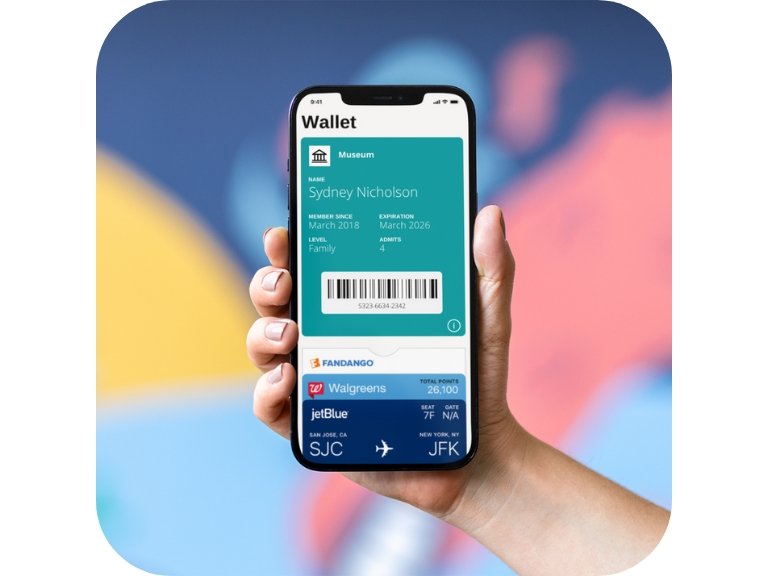
“[Digital membership cards] are easy and modern for museums like ours that are moving into a digital focus over traditional paper methods.”
- Brad Ingles, Membership and Community Partnerships Manager at Museum of Contemporary Art Denver
Ready to Transform Your Museum Membership Program?
FAQS
-
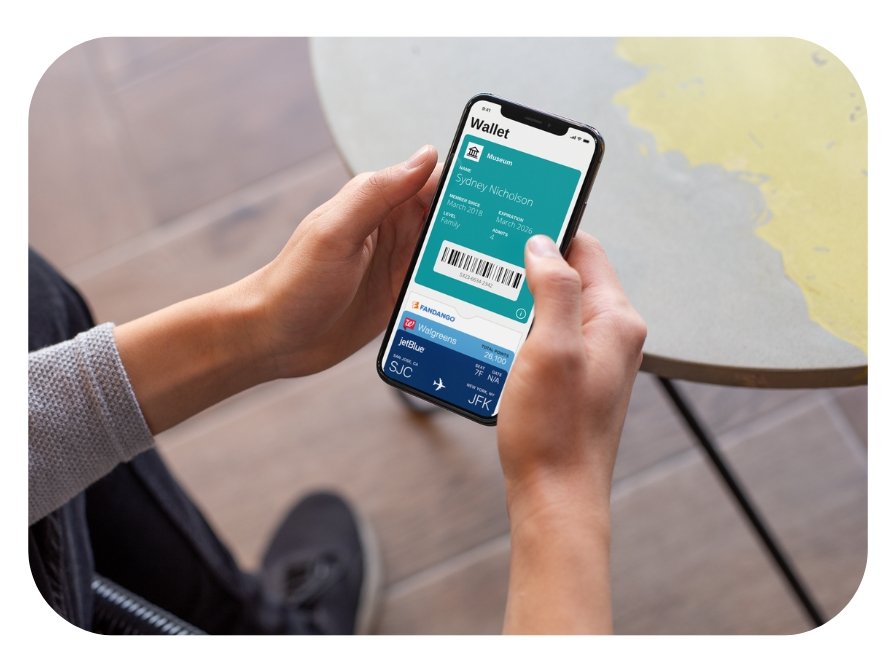
Digital membership cards are electronic versions of traditional membership cards. Once a member signs up or renews, they receive a personalized digital card directly on their smartphone via email or SMS. These cards can be stored in their phone’s wallet app (Apple Wallet or Google Wallet) for easy access and always remain up to date.
-
Digital membership cards are delivered instantly through multiple distribution channels:
• Email: Members receive an email with a link to download the card directly to their phone.
• SMS/Text: A text message with a direct link to their digital card.
• Member Portal: Cards can be accessed and downloaded from a member login page if applicable.
You can customize the delivery method based on your organization’s preferences.
-
Downloading and using a digital membership card is easy:
1. Members receive a link via email or SMS.
2. They tap the link, which opens their personalized digital card.
3. On iPhones, they can add it to Apple Wallet. On Android devices, they can save it to Google Wallet or access it via the link anytime.
Once saved, members can easily show their card for benefits, event access, or discounts.
-
Yes, our digital membership cards integrate seamlessly with most major CRM and membership management systems. This ensures that member data stays up to date and allows for the automatic generation and distribution of cards when members sign up, renew, or upgrade their membership.
We support direct integration with popular CRMs, including:
• Salesforce
• Blackbaud Altru + Raiser’s Edge NXT
• Tessitura Network
• PatronManager
• NEON CRM
• Spektrix
• ACME Ticketing
Additionally, through Zapier, we can connect with over 700+ CRMs and apps for customized workflows. This includes platforms like:
• Dynamics 365
• Bloomerang
• Kindful
• Salsa CRM
• Keela
• HubSpot
• SugarCRM
• iMIS
If your CRM isn’t listed, don’t worry—we offer custom integration solutions to meet your specific needs.
-
Absolutely! Your digital membership card can be fully customized to reflect your museum’s brand. This includes your logo, brand colors, and personalized fields for member information, expiration dates, and more. You can even add links to exclusive offers, event calendars, or social media pages.
-
No problem! Since digital cards are stored on the member’s phone, they are less likely to be lost than physical cards. However, if a member deletes their card or loses their device, they can easily retrieve it by:
• Accessing the original email or SMS with the download link.
• Contacting your membership team for a new link.
-
Our digital membership cards are highly secure. They are generated with unique identifiers to ensure that only the intended recipient can access them. Additionally, sensitive information is protected with advanced encryption, and member data is never shared with third parties.
-
Yes! You can add dynamic content to your digital cards, such as:
• Event Reminders: Notify members of upcoming exhibitions or exclusive events.
• Special Offers: Offer discounts or perks to members and update them in real-time.
• Renewal Notices: Automatically remind members when it’s time to renew their membership.
-
Most organizations can launch their digital membership cards within a few days. Our team will guide you through the setup process, including integration with your CRM and customization of the card design. Once the system is live, cards can be generated and distributed automatically.
-
Yes! Digital membership cards are compatible with both iOS and Android devices. Members with iPhones can store their cards in Apple Wallet, while Android users can use Google Wallet or save the card link for easy access.
Join the Growing List of Museums Using Digital Membership Cards
Methodology
Comparisons are based on publicly available product documentation, vendor websites, app store listings and customer reviews at the time of review. Vendors update their products frequently, so we recommend confirming details directly with each provider before making a decision.
About Cuseum
Cuseum helps museums, zoos, gardens, associations and other member-based organizations deliver Digital Membership Cards and mobile engagement experiences. Members receive a digital wallet pass by text or email, and staff manage everything from one dashboard.